
Julio Iglesias - Nostalgie Ukulele Chords
Before you play, tune your ukulele and use the tools below to set up your view and flow.
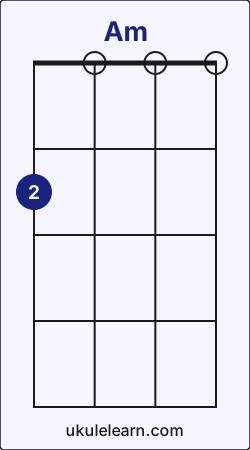
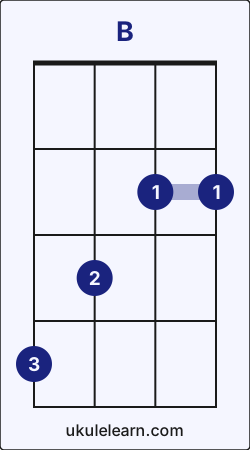
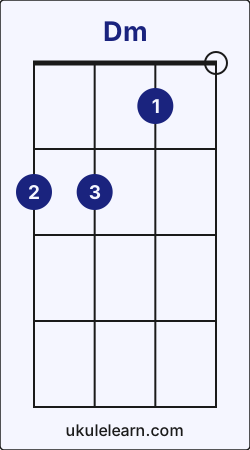
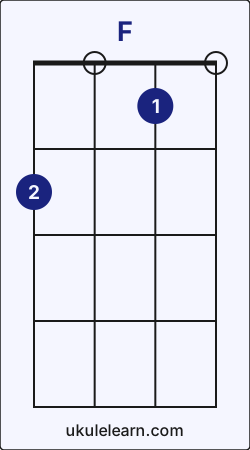
How to play Nostalgie on Ukulele (Step-by-step)
Julio Iglesias - Nostalgie on ukulele requires 5 chords and 6 core chord transitions. You can find the full step-by-step guide below. Before you start, tune your instrument. The song uses the ↓↑-↓↑-↓↑-↓↑ pattern; practice it muted first, or simplify to downstrokes while you learn the changes.
Nostalgie uses these transitions most often: Am → F (14), E → Am (10), and F → E (8). These transitions may feel a little challenging at first, but with steady practice you can play this song quickly.When you are ready, begin with Am - B chord transition.
1. Am → B chord transition
To move from Am to B:
- Lift your middle finger from G string fret 2 and place it on C string fret 3.
- Place index finger on E string fret 2.
- Place ring finger on G string fret 4.
This transition appears in the section, played 4 times.
2. B → Dm chord transition
To move from B to Dm:
- Slide your index finger on E string from fret 2 to fret 1.
- Slide your middle finger from C string fret 3 to G string fret 2.
- Lift your ring finger from G string fret 4 and place it on C string fret 2.
This transition appears in the section, played 4 times.
3. Dm → Am chord transition
To move from Dm to Am:
- While playing Dm, first lift your index finger and ring finger.
- Keep middle finger on G string fret 2.
This transition appears in the section, played 4 times.
4. Am → F chord transition
Switching from Am to F:
- Keep middle finger on G string fret 2.
- Place index finger on E string fret 1.
This transition appears in the section, played 14 times.
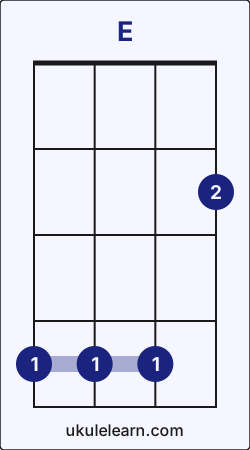
5. F → E chord transition
Switching from F to E:
- Lift your index finger from E string fret 1 and place it on G string fret 4.
- Slide your middle finger from G string fret 2 to A string fret 2.
This transition appears in the section, played 8 times.
6. E → Am chord transition
To move from E to Am:
- While playing E, lift your index finger from G string fret 4.
- Lift your middle finger from A string fret 2 and place it on G string fret 2.
This transition appears in the section, played 10 times.
Nostalgie chord transition analysis
A short, data-driven summary of the chord flow in Nostalgie.
- Nostalgie includes 52 chord transitions, 6 of them unique.
- These transitions represent 0.01% of all chord transitions in Ukulelearn.
- Nostalgie contains 1 of the top 10 transitions across Ukulelearn.
- These transition patterns show how Nostalgie connects to the rest of Ukulelearn. Mastering them helps you move to similar songs faster.After Am, the most likely next chords across Ukulelearn are F (26%), G (21%), and C (16%).
- Am → F: 26%
- Am → E: 1%
After F, the most likely next chords across Ukulelearn are C (40%), G (21%), and Am (11%).- F → Am: 11%
- F → E: 1%