
The Lumineers - My Cell Ukulele Chords
Before you play, tune your ukulele and use the tools below to set up your view and flow.
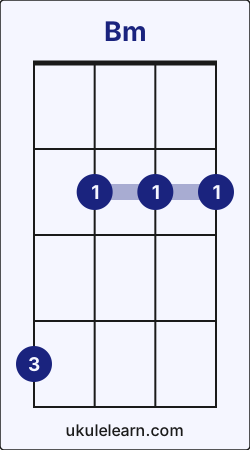
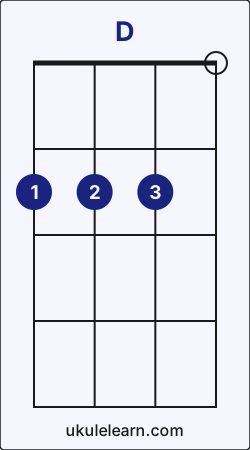
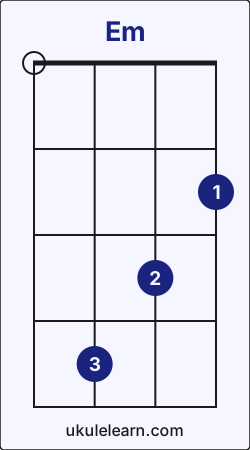
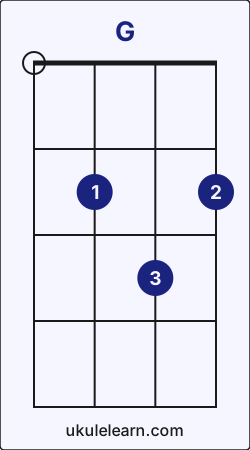
How to play My Cell on Ukulele (Step-by-step)
The Lumineers - My Cell on ukulele requires 4 chords and 5 core chord transitions. You can find the full step-by-step guide below. Before you start, tune your instrument. The song uses the ↓-↓↑-↓↑-↓↑ pattern; practice it muted first, or simplify to downstrokes while you learn the changes.
My Cell uses these transitions most often: Bm → D (22), G → Bm (21), and Em → G (18). These transitions may feel a little challenging at first, but with steady practice you can play this song quickly.When you are ready, begin with Bm - D chord transition.
1. Bm → D chord transition
Switching from Bm to D:
- Lift your index finger from C string fret 2 and place it on G string fret 2.
- Slide your ring finger from G string fret 4 to E string fret 2.
- Place middle finger on C string fret 2.
This transition appears in the section, played 22 times.
2. D → Em chord transition
Switching from D to Em:
- Lift your index finger from G string fret 2 and place it on A string fret 2.
- Slide your middle finger from C string fret 2 to E string fret 3.
- Lift your ring finger from E string fret 2 and place it on C string fret 4.
This transition appears in the section, played 12 times.
3. Em → G chord transition
Switching from Em to G:
- Lift your index finger from A string fret 2 and place it on C string fret 2.
- Slide your middle finger from E string fret 3 to A string fret 2.
- Lift your ring finger from C string fret 4 and place it on E string fret 3.
This transition appears in the section, played 18 times.
4. G → Bm chord transition
Switching from G to Bm:
- While playing G, lift your middle finger from A string fret 2.
- Keep index finger on C string fret 2.
- Lift your ring finger from E string fret 3 and place it on G string fret 4.
This transition appears in the section, played 21 times.
5. D → G chord transition
Here's how to move from D to G:
- Lift your index finger from G string fret 2 and place it on C string fret 2.
- Slide your middle finger from C string fret 2 to A string fret 2.
- Slide your ring finger on E string from fret 2 to fret 3.
This transition appears in the section, played 10 times.
My Cell chord transition analysis
A short, data-driven summary of the chord flow in My Cell.
- My Cell includes 89 chord transitions, 5 of them unique.
- These transitions represent 0.02% of all chord transitions in Ukulelearn.
- My Cell contains 2 of the top 10 transitions across Ukulelearn.
- These transition patterns show how My Cell connects to the rest of Ukulelearn. Mastering them helps you move to similar songs faster.After G, the most likely next chords across Ukulelearn are C (25%), D (24%), and Am (13%).
- G → Em: 9%
- G → Bm: 4%
After Bm, the most likely next chords across Ukulelearn are G (25%), A (19%), and Em (13%).- Bm → D: 12%